

Introduction: The Drain of Digital Drudgery
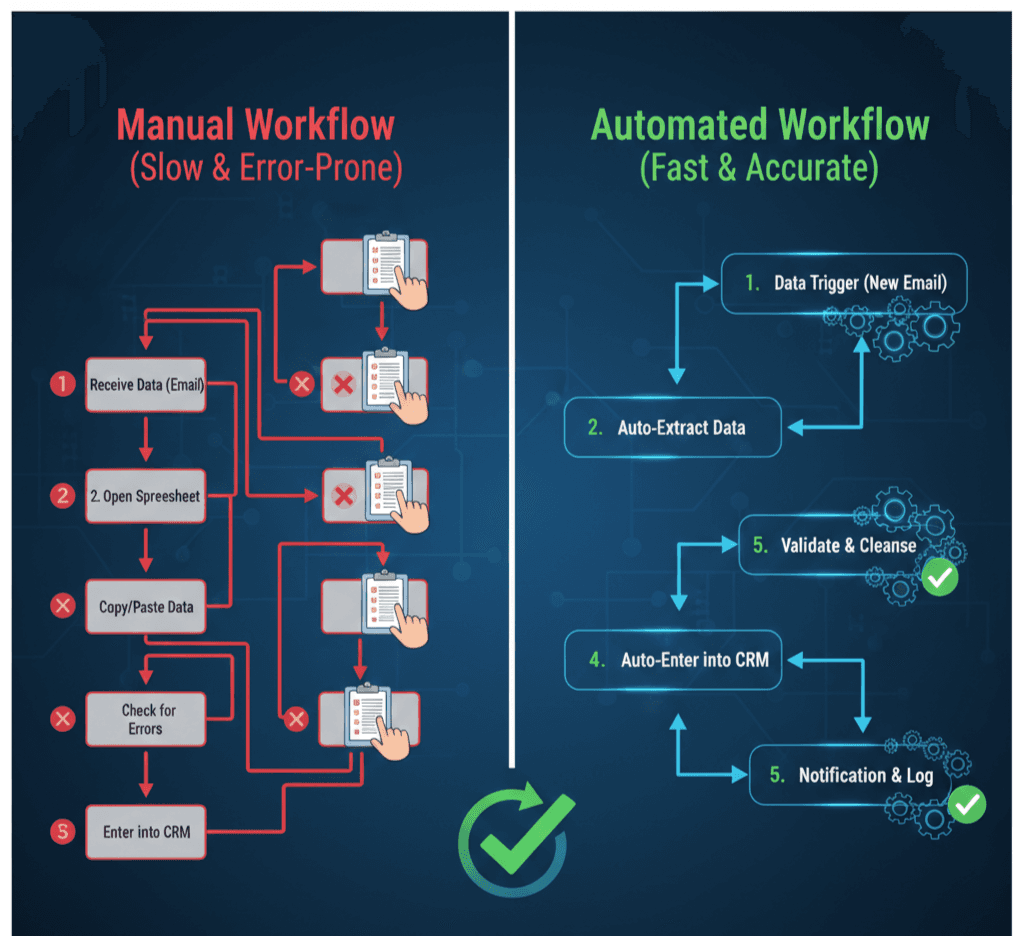
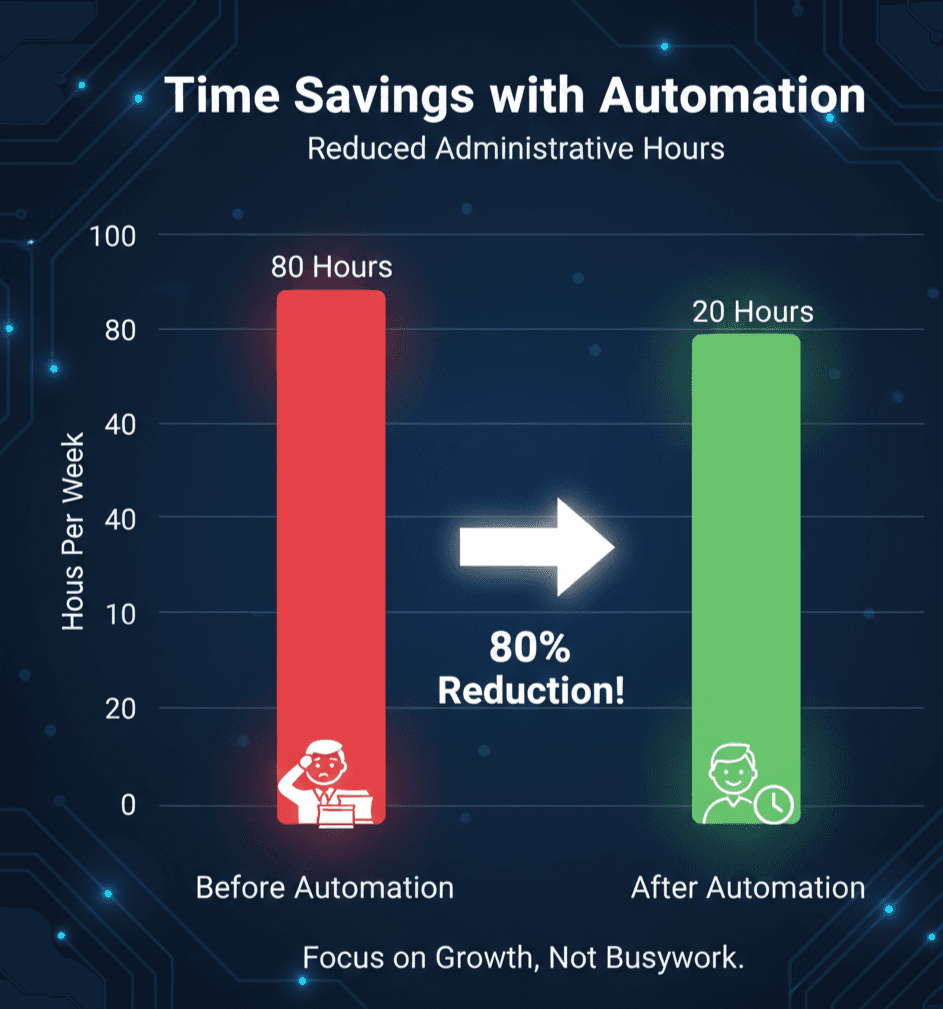
The modern professional spends a significant portion of their week on repetitive, low-value administrative tasks: copying data, scheduling meetings, generating basic reports, and following up on manual reminders. These tasks are a massive drain on productivity and divert highly skilled employees from core, high-impact work. Automation and AI tools offer the solution, transforming these redundant steps into seamless, background workflows. By strategically targeting the right tasks, any team can realistically reclaim 10 or more hours of staff time per week, significantly boosting overall organizational efficiency.
Identifying Your Automation Opportunities
The best candidates for automation are tasks that meet the “3 Rs”: Repetitive, Rule-based, and Regular.
- Repetitive Data Entry: Moving information from one system (e.g., a web form) to another (e.g., a CRM).
- Rule-Based Decision Making: Actions triggered only when a specific condition is met (e.g., if a support ticket is marked “Closed,” send a follow-up email).
- Regular Reporting: Generating the same weekly/monthly metric summaries for leadership.
Three High-Impact Automation Workflows
Focus on these three workflows for maximum time savings and administrative efficiency:
- Automating Lead Data Handover (Sales/Marketing):
- Workflow: When a new lead fills out a Google Form/Typeform, an automation tool (like Zapier or HubSpot workflows) instantly creates a new contact record in the CRM, assigns a task to the correct sales rep based on territory rules, and sends a personalized welcome email.
- Time Saved: Eliminates manual data entry and ensures immediate, consistent follow-up.
- Automating Meeting Scheduling and Follow-up (Client Management):
- Workflow: Integrating a scheduling tool (like Calendly) with your calendar and email. Once a client books a meeting, the workflow automatically sends confirmation, adds the client to a pre-meeting reminder sequence, and logs the event in the CRM.
- Time Saved: Eliminates email back-and-forth and manual reminder creation.
- Automating Expense and Reporting Reminders (Administrative):
- Workflow: On the last business day of the month, the system automatically pulls expense data from a finance tool, generates a status report template, and emails all managers with a reminder to finalize their approvals.
- Time Saved: Reduces tedious chasing and ensures deadlines are met consistently.
Quote: “Automation is not about doing the job of a person; it’s about giving your people back the time to do their actual job.”
Best Practices for Implementation
To ensure automation efforts are successful:
- Audit First: Before implementing any tool, spend a week logging exactly how long repetitive tasks take. This proves the ROI of the automation project.
- Keep it Simple: Start with one simple, high-frequency task. Perfect that workflow before moving to complex, multi-step integrations.
- Test and Monitor: Always test the entire workflow multiple times. Set up internal alerts to notify a human when an automation sequence fails or triggers an error.
Conclusion: The Strategic Investment in Time
Automation is no longer a luxury for large corporations; it’s a fundamental requirement for boosting team efficiency and maximizing resource output. By focusing on automating repetitive administrative tasks, your organization can reclaim valuable staff time, reduce the incidence of human error, and refocus its energy on strategic initiatives that truly drive growth and competitive advantage.






Leave a comment